

Intro
A clean desk is more than aesthetics — it reduces distractions, improves ergonomics, and helps you get into a focused workflow faster. The right tech accessories can reclaim desktop space, tame cables, and keep essential tools within reach without clutter.
Whether you work from home, manage a multi-monitor trading station, or want a streamlined creative setup, invest in accessories that solve specific problems. Start with reliable, well-designed items from the right categories and prioritize functionality over novelty — a practical approach you can explore in Todlarz’s Tech & Gadgets section.
Why tidy desks improve productivity
Clutter drains attention and increases the cognitive load required to find things. A desk that keeps items organized reduces micro-distractions such as searching for cables or untangling headphones. Practically, this means smoother transitions between tasks and fewer breaks in concentration.
Designing a productive desk starts with planning: define zones for input (keyboard, tablet), output (monitor, speakers), and storage (small items, chargers). Each accessory you add should serve a clear purpose in one of those zones.
Choose a space-saving monitor
A slim, efficient monitor reduces bezel clutter and gives you more usable desk space. Opt for a monitor with a small stand footprint or VESA compatibility so you can mount it. Consider dimensions and viewing distance first — a well-sized monitor improves posture and reduces the need for extra peripherals.
For a reliable, compact option that balances size and clarity, consider the PHILIPS 22-inch monitor. Its slim profile and VESA support make it easy to integrate into a minimalist setup.
Dual screens and monitor stands: reduce footprint, increase flexibility
If you need two screens, choose thin-bezel panels or use a monitor arm to free desk space underneath. A good arm elevates screens to ergonomic height, opens room for storage below, and lets you tilt or rotate displays for collaborative work or portrait mode.
Smaller, efficient monitors like the ASUS 22” monitor work well on arms or stands, especially for setups that prioritize desk clearance and clean cable routing.
Headphone stands and mounts keep gear accessible
Headphones often create clutter when left on the desk or tangled on the edge of a monitor. A dedicated stand or under-desk mount stores them off the work surface while keeping them within easy reach. Look for adhesive or clamp mounts if you can’t drill into furniture.
A compact option that sticks or clamps neatly under a shelf is the Lamicall Headphone Stand, which prevents dangling cables and clears space for small accessories.
Cable management: the invisible productivity booster
Cables are the biggest visual and practical threat to a clean desk. Use under-desk trays, adhesive clips, and short, labeled cables to consolidate power and data lines. Group power bricks in a single accessible location and route longer cables along the underside of the desk to keep the surface clear.
For storage solutions that complement cable routes and hide power strips, look through the Home Essentials category for small organizers, trays, and containers that keep extras out of sight but within reach.
Pick a compact PC case or docking solution
A well-chosen computer case can reduce the footprint of your desktop setup. Compact mid-tower cases with good airflow let you position the machine under the desk or to the side without overheating. If you use a laptop, a docking station can centralize connections, letting you connect one cable to the laptop while hiding the rest.
For desktop builders who want a balance of space and performance, the Thermaltake Ceres 300 is an example of a modern mid-tower that supports effective cable routing and keeps components organized inside a compact footprint.
Desk audio without the clutter
High-quality audio improves focus and makes calls clearer, but bulky speaker setups take space. Choose compact speakers or a single stereo unit that fits on a shelf or a monitor stand. Bluetooth devices reduce cable clutter, while wall or shelf placement frees desk real estate.
For portable, waterproof options that double as a small desktop speaker, consider the MIATONE portable Bluetooth speaker. For broader audio options and compact soundbars, browse the Audio & Television section to compare form factors and connectivity.
Power and charging strategies
Centralize charging in a single location with a multi-port charger or USB hub. Prefer shorter cables with right-angle ends for devices you reach for frequently. Use a wireless charging pad for phones to limit cable insertion and removal — place it near your primary zone to avoid crossing the desk.
Label adapters and keep a small caddy for spare cables and dongles. This reduces the time spent fishing for the right lead and prevents a pile-up of unused chargers on the surface.
Accessory organizers and lighting
Use small trays for daily essentials like pens, styluses, and keycards. A slim desk lamp with directional light reduces the need for multiple light sources and preserves desk space. Choose a lamp that clamps to the desk or mounts to the monitor if you need an ultra-clean surface.
Limit decorative items to one or two meaningful pieces; every additional object increases visual clutter and reduces functional workspace.
Quick checklist
- Choose monitors with small footprints or use VESA arms.
- Mount headphones to free up surface area.
- Consolidate cables with under-desk trays and adhesive clips.
- Use a compact PC case or docking station to centralize connections.
- Select Bluetooth speakers or a single compact speaker to avoid multiple cables.
- Label and store spare cables in a small tray or drawer.
- Keep lighting clamped or mounted to minimize surface use.
FAQ
- Q: How do I choose between a stand and an arm for my monitor?
A: Choose a stand if you need simple height adjustment and a small footprint; choose an arm if you require full articulation and want the space under the screen cleared for storage. - Q: Are adhesive headphone mounts secure?
A: High-quality adhesive mounts and clamp options are secure if installed on a clean, compatible surface; clamps provide a stronger mechanical hold when drilling is not allowed. - Q: What’s the best way to hide power strips?
A: Mount them under the desk or inside a cable tray. Use short, labeled cables and route them through a single grommet or hole to the strip to minimize visible runs. - Q: Should I prioritize wireless audio or wired for desk setups?
A: Wireless is best for reducing desk cables and supporting mobile devices; wired is preferable for professional audio work where latency and reliability matter. - Q: How can I keep a clean desk while still having quick access to tools?
A: Define zones, use organizers with quick-access trays, mount items off the surface, and limit desktop objects to daily-use items only.
Conclusion
Small, deliberate additions transform a messy desk into a productive workspace. Start by decluttering and add focused accessories — a compact monitor, a mounted headphone stand, tidy cable management, and a compact case or docking station — each choice should remove friction from your daily routine. Use the checklist to implement changes gradually and assess what genuinely improves your workflow.
Products Featured in This Article
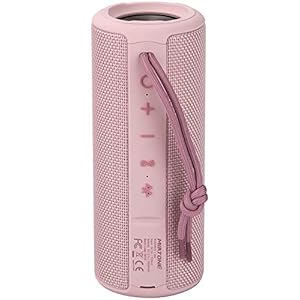
MIATONE Out of doors Transportable …
[Immersive Sound] Featuring MIATONE unique audio processing, the sound quality of BOOMBOX bluetooth speaker is significantly…

PHILIPS 22 inch Class Skinny Full H…
CRISP CLARITY: This 22 inch class (21.5″ viewable) Philips V line monitor delivers crisp Full HD…

Thermaltake Ceres 300 Matcha Inexpe…
Perforated panel allows massive airflow for excellent cooling performance Supports up to 360mm radiator at the…

Lamicall Headphone Stand, Adhesive …
【 Easily Installation】Tear off the sticker and stick it under your desk easily without more complicated…

ASUS 22” (21.45” viewable) 1080…
21.45-inch Full HD (1920 x 1080) IPS monitor with stylish ultra-slim profile only 6.5mm thin Up…