

Tech Gadgets That Make Everyday Life More Convenient
Everyday life gets easier when the right gadgets remove small frictions—charging faster, monitoring the home, capturing moments, or freeing up time in the kitchen. The best devices are reliable, easy to use, and solve a clear problem.
This guide highlights practical tech picks and how to use them to simplify routines, improve productivity, and add convenience without complexity.
Smart speakers and home hubs: simplify daily controls
Smart speakers are now core household tools: they control lights, set timers, answer quick questions, and act as hands-free assistants while you cook or work. When choosing one, prioritize voice accuracy, ecosystem compatibility, and privacy settings. The right hub also lets you centralize devices from multiple brands so you can manage them from a single app or voice command. For a look at compatible peripherals and small desktop hubs, check the selection in Tech & Gadgets that work well with most smart speaker systems.
A better TV for everyday viewing and streaming
A modern smart TV is more than a screen: it’s a living-room hub for streaming, video calls, and casual gaming. Look for good HDR support, reliable smart platform updates, and built-in voice control if you want to skip extra remotes. Larger screens with solid upscaling will make low-resolution streams look better, and built-in AirPlay or casting makes mirroring from phones painless. If you’re upgrading your main display, consider models with modern smart features like the TCL 65-inch options for balanced performance and convenience: TCL 65-Inch Smart TV.
Portable audio: take reliable sound everywhere
Portable Bluetooth speakers and compact earbuds let you move music and podcasts with you—kitchen, yard, or commute—without fuss. Prioritize battery life, water resistance for outdoor use, and a stable Bluetooth connection. For a simple, splash-resistant option that’s great for outdoor listening and easy pairing with phones and tablets, check out portable models like the MIATONE portable Bluetooth speaker. These small devices are ideal when you want strong sound without elaborate setups.
Monitors and productivity screens: improve posture and workflow
A good external monitor transforms a laptop into a productive workstation—more screen real estate, better ergonomics, and less neck strain. Choose a 22–27″ IPS or VA panel with adjustable stand and blue-light reduction if you spend extended hours at a desk. Higher refresh rates help reduce motion blur for mixed use (video and light gaming), while multiple input ports keep cables tidy. For a dependable desktop upgrade, consider a thin 22-inch full HD monitor that balances clarity and comfort: PHILIPS 22 inch monitor.
Action cameras and easy content capture
For active families and creators, compact action cameras remove the need to protect expensive gear while capturing high-quality footage on the go. Look for strong image stabilization, easy mounting options, and direct-to-phone wireless transfer to speed editing and sharing. Modern action cameras handle low-light and water exposure without extra cases, making them ideal for adventures and everyday milestones. If you need rugged, versatile capture for travel, sports, and quick vlogging, a bundled action camera like the GoPro HERO12 is a solid pick for reliable results with minimal setup.
Baby monitors and family tech: monitoring without stress
Modern baby monitors do more than show video; they provide two-way audio, temperature sensors, and night vision so caregivers can respond quickly without constant room visits. Prioritize a model with secure transmission, responsive alerts, and an easy-to-read display. Portable displays and Wi‑Fi-enabled units give flexibility across large homes. For a straightforward, family-focused monitor with a clear display and sleep-friendly features, consider solutions such as the Video Child Monitor with Camera.
Home security made simple
Battery-powered, wireless security cameras make installation painless and let you monitor entrances and yards without running wires. Look for cameras with long battery life, good night vision, and configurable motion zones to prevent false alerts from passing trees. Built-in sirens, spotlights, and two-way audio increase deterrence and communication. For a comprehensive and low-maintenance outdoor option, explore systems like the AOSU wireless security cameras that combine long battery life and smart alerts in one package.
Kitchen and home essentials that save time
Smart plugs, programmable coffee makers, and connected slow cookers take small chores off your plate and integrate with routines. Pair smart outlets with voice assistants to automate lights or appliances on schedules, and choose appliances with durable construction and easy-to-clean parts. For a broader look at gadgets and timed kitchen helpers that fit into everyday living, browse the curated options in Home Essentials to find items that match your workflow.
- Choose compatibility first: pick gadgets that work with your phone and ecosystem.
- Prioritize battery life and durability for portable devices.
- Use motion zones and notification settings to reduce false alerts on cameras.
- Invest in one or two high-quality items rather than many low-cost gadgets.
- Test new devices in small steps to incorporate them into routines gradually.
FAQ
Q: How do I choose between Wi‑Fi and Bluetooth devices?
A: Use Wi‑Fi for devices needing remote access and integration (cameras, smart plugs). Choose Bluetooth for portable, local use (speakers, headphones) where simplicity and battery life matter.
Q: Are smart home devices hard to secure?
A: No—start by changing default passwords, enabling two-factor auth when available, and keeping firmware updated. Place devices on a guest or separate IoT network if your router supports it.
Q: Will a smart TV require frequent software updates?
A: Manufacturers often release periodic updates. Check manufacturer policies and choose models from brands that commit to timely software support to avoid compatibility issues.
Q: How do I get better battery life from portable gadgets?
A: Reduce maximum volume, disable always-on features, and use power-saving modes. For speakers and cameras, pack a small power bank for extended outings.
Q: Can I use an action camera for everyday family photos?
A: Yes—modern action cameras capture high-quality stills and video and are especially useful where durability and compact form factor are priorities.
Conclusion
Small, well-chosen tech gadgets remove daily friction—improving convenience, safety, and productivity. Focus on compatibility, ease of use, and durability when selecting gear. Start with one upgrade that addresses your biggest daily annoyance and build from there.
Products Featured in This Article
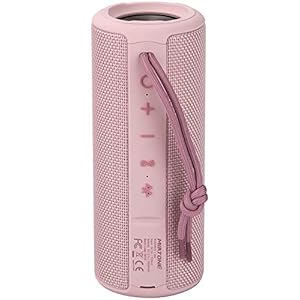
MIATONE Out of doors Transportable …
[Immersive Sound] Featuring MIATONE unique audio processing, the sound quality of BOOMBOX bluetooth speaker is significantly…

Video Child Monitor with Digicam an…
Stay Connected with Your Baby: The HB32 video baby monitor with camera and audio is the…

PHILIPS 22 inch Class Skinny Full H…
CRISP CLARITY: This 22 inch class (21.5″ viewable) Philips V line monitor delivers crisp Full HD…

GoPro HERO12 (HERO 12) Black –…
Dive into Action: Experience the thrill of exploring the depths with the fully waterproof HERO12 Black,…

AOSU Safety Cameras Wi-fi Out of do…
Real 2K HD aosu WirelessCam Pro System 2 Cam Kit – Security Camera Outdoor, Wireless Home…

TCL 65-Inch Class S5 UHD 4K LED Goo…
4K UltraHD Resolution – Experience incredible detail with 4X the resolution of 1080p Full HDTVs. High…